Retrieval Augmented Generation
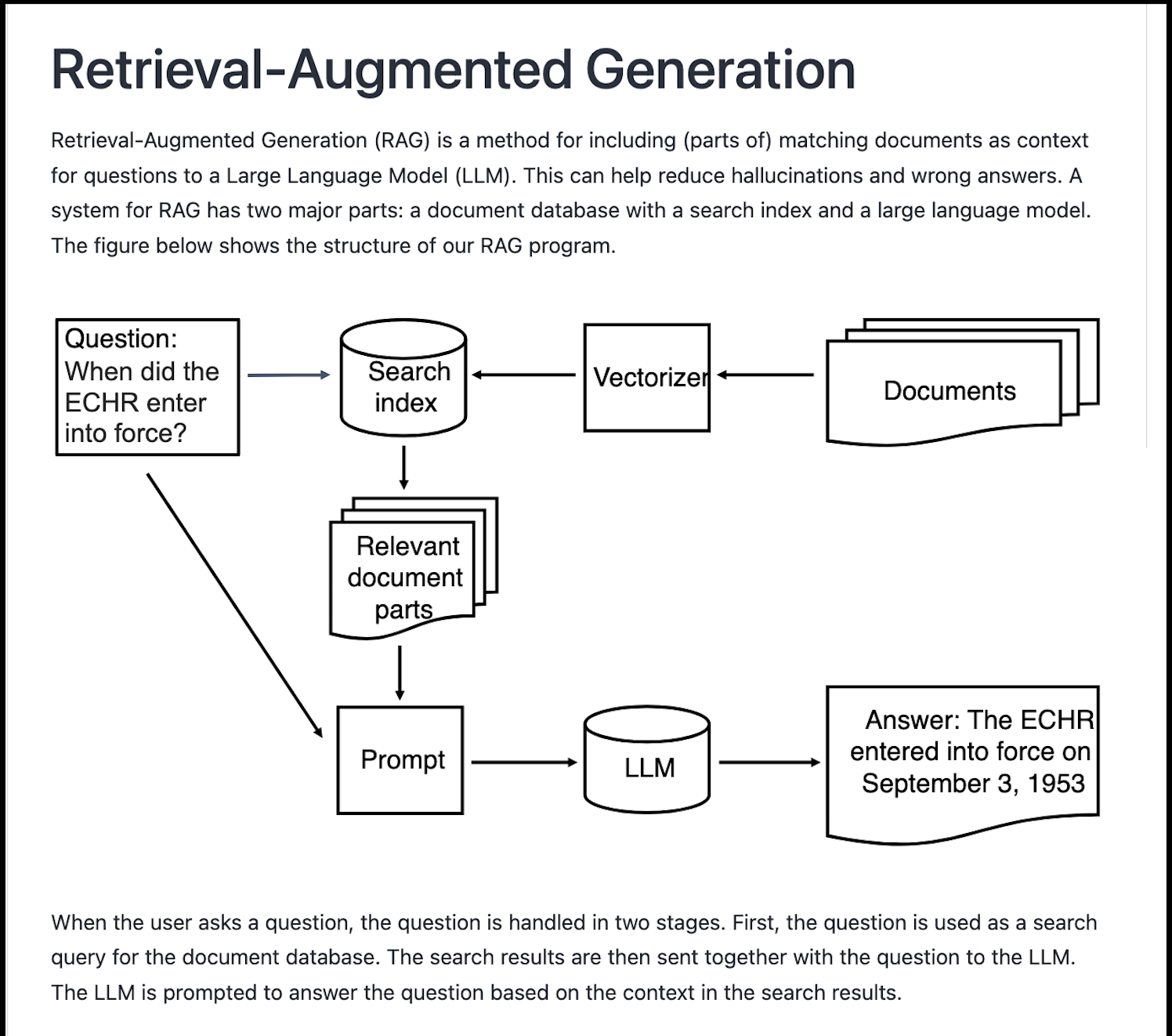
Our project is the result of team work. We have two sets of documentation pages. Thanks to our team member for illustrating the process .
Code view 1:
import os
os.environ['HF_HOME'] = '/fp/projects01/ec443/huggingface/cache/'
The Model
First, we check if we have GPU available.
code view 3:
import torch
device = 0 if torch.cuda.is_available() else -1
The pipeline from huggingface. code view 4:
from langchain_huggingface.llms import HuggingFacePipeline

llm = HuggingFacePipeline.from_model_id(
    model_id='mistralai/Mistral-7B-Instruct-v0.3',
    # model_id='meta-llama/Llama-3.2-3B-Instruct',
    task='text-generation',
    device=device # device = 0
    pipeline_kwargs={
        'max_new_tokens': 500,
        'do_sample': True,
        'temperature': 0.3,
        'num_beams': 4
    }
)
Using the model
First, we are going to use the language model without connecting it to the documents. The output will be what the model knows from before, on the subject we ask.
code view 4:
# Use with models from Meta
#llm.pipeline.tokenizer.pad_token_id = llm.pipeline.tokenizer.eos_token_id

query = 'What are the major contributions of the Trivandrum Observatory?'
output = llm.invoke(query)
The Vectorizer
Text must be vectorized before it can be processed. Our HuggingFace pipeline will do that automatically for the large language model. But we must make a vectorizer for the search index for our documents database. We use a vectorizer called a word embedding model from HuggingFace. Again, the HuggingFace library will automatically download the model. You can read more on the Embedding model here . The developer writes this in the readme file: “BGE M3 is an embedding model supporting dense retrieval, lexical matching and multi-vector interaction”.
code view 5:
from langchain_huggingface import HuggingFaceEmbeddings

huggingface_embeddings = HuggingFaceEmbeddings(
    model_name='BAAI/bge-m3',
    model_kwargs = {'device': 'cuda:0'},
    #or: model_kwargs={'device':'cpu'},
    encode_kwargs={'normalize_embeddings': True}
)
The arguments of the embeddings
These are the arguments to the embedding model:
‘model_name’: the name of the model on HuggingFace

‘device’: the hardware device to use, either a GPU or CPU

‘normalize_embeddings’: embeddings can have different magnitudes. Normalizing the embeddings makes their magnitudes equal.
Document location
Code view 6
document_folder = '/fp/projects01/ec443/documents'
Code view 7:
Loading the documents
code view 8:
from langchain_community.document_loaders import DirectoryLoader

loader = DirectoryLoader(document_folder)
documents = loader.load()
code view 9:
print(f'Number of documents:', len(documents))
print('Maximum document length: ', max([len(doc.page_content) for doc in documents]))
The document loader loads each file as a separate document. We can check how long our documents are. For example, we can use the function max() to find the length of the longest document.
We can examine one of the documents
code view 10:
print(documents[0])
Splitting the documents
code view 11:
from langchain.text_splitter import RecursiveCharacterTextSplitter

text_splitter = RecursiveCharacterTextSplitter(
    chunk_size = 700, #  Could be more, for larger models like mistralai/Ministral-8B-Instruct-2410
    chunk_overlap  = 200,
)
documents = text_splitter.split_documents(documents)
We can check if the maximum document length has changed:
code view 10:
print(f'Number of documents:', len(documents))
print('Maximum document length: ', max([len(doc.page_content) for doc in documents]))
The Document Index
code view 11:
from langchain_community.vectorstores import FAISS
vectorstore = FAISS.from_documents(documents, huggingface_embeddings)
code view 12:
relevant_documents = vectorstore.similarity_search(query)
print(f'Number of documents found: {len(relevant_documents)}')
code view 13:
print(relevant_documents[0].page_content)
For our RAG application we need to access the search engine through an interface called a retriever:
code view 14:
retriever = vectorstore.as_retriever(search_kwargs={'k': 3})
Retriever arguments
These are the arguments to the retriever:
‘k’: the number of documents to return (kNN search)
Making a prompt
code view 15:
from langchain.prompts import PromptTemplate

prompt_template = '''You are an assistant for question-answering tasks.
Use the following pieces of retrieved context to answer the question.
Context: {context}

Question: {input}

Answer:
'''

prompt = PromptTemplate(template=prompt_template,
                        input_variables=['context', 'input'])
Making the “Chatbot”
code view 16:
from langchain.chains import create_retrieval_chain
from langchain.chains.combine_documents import create_stuff_documents_chain

combine_documents_chain = create_stuff_documents_chain(llm, prompt)
rag_chain = create_retrieval_chain(retriever, combine_documents_chain)
Asking the “Chatbot”
code view 17:
result = rag_chain.invoke({'input': query})
code view 18:
print(result['answer'])